
When booking flights with connections, not every route will suit your travel plans. You may prefer to avoid certain transit airports, consider visa requirements, or choose specific hubs for longer journeys.
As flights through some major transit hubs are currently being cancelled, delayed or rerouted due to airspace closures, we've launched a new Layovers filter to help travellers customise their connection preferences. The feature is available on desktop and mobile web.

What is the Layovers filter?
The Layovers filter is a search feature that gives you more control over your route when booking flights with connections.
Instead of simply choosing the cheapest or fastest option, you can filter out specific connecting airports you’d prefer not to transit through.
This means:
You can avoid layovers in impacted airports
You can exclude specific transit hubs from your results
You can choose routes that give you greater peace of mind
You can narrow your options to routes that better suit your travel plans
It’s available on desktop and mobile web as part of your flight search filters.
How to filter layover airports on Skyscanner
You can customise your layover preferences directly from the filters panel.

Step 1: Search for your flight
Enter your departure airport, destination and travel dates as usual.

Step 2: Open the filters panel
Once results load, open the filters section and scroll to Layovers.

Step 3: Adjust your layover duration
Use the slider to set the maximum layover time you’re comfortable with.
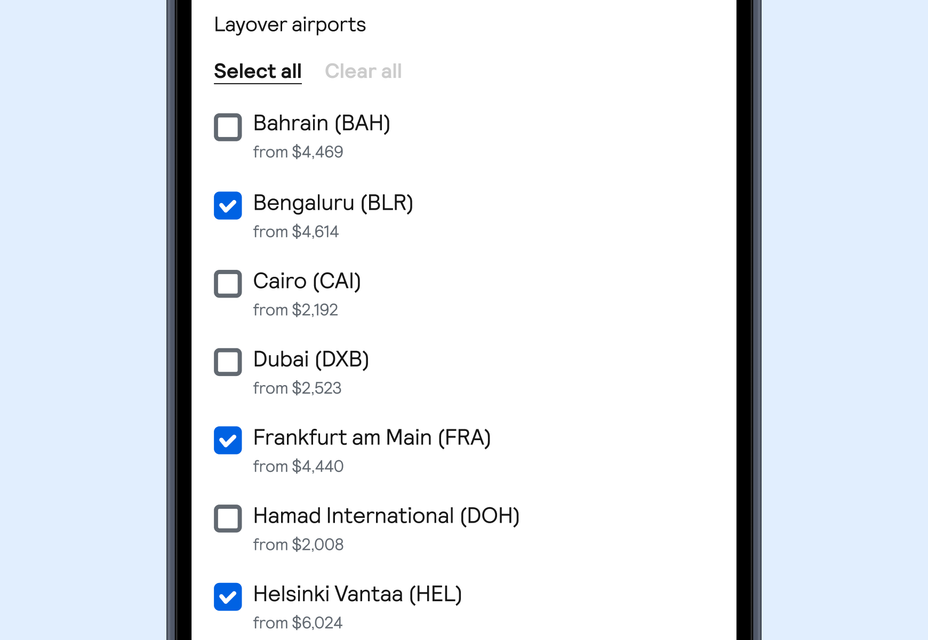
Step 4: Choose your layover airports
Under Layover airports, uncheck any airports you don’t want to connect through. You can select individual airports or clear all to reset your options. Your results will automatically update as you adjust your preferences.
FAQs Control where you connect with the Layovers filter
If you exclude popular transit hubs or shorten your maximum layover time, you may see fewer results or higher fares. Try adjusting your filters to compare different route options.